
Horticulture Officer
Job Description
Advt No. 1 Date 06-02-2026
Job Title
Horticulture Officer
Job location
TDU campus, Bengaluru
Job summary
We are seeking a dedicated and knowledgeable Horticulture Officer to join our team at the TDU Campus in Bengaluru. The ideal candidate will have a strong background in horticulture, with specific experience in cultivating native and medicinal plants. In this role, one will contribute to the design, implementation, and maintenance of ecologically functional and aesthetically pleasing landscapes that support biodiversity and sustainability goals
Project Title
Ecoscape India
Project nature (Permanent / Temporary)
Temporary
Job Specification
Qualification
Degree in Horticulture preferably specialisation or certification in native flora, medicinal plants or ecological restoration.
Experience
2-3 years of practical experience in in horticulture, gardening, or landscape management, preferably with native/medicinal plants.
Familiarity with native plant identification, propagation techniques, and pest/disease management in an Indian context.
Skills
Strong practical knowledge of plant care, soil management, and seasonal planting.
Ability to work outdoors in varying weather conditions and manage physical tasks.
Good organisational and supervisory skills.
Passion for ecological restoration, sustainability, and native biodiversity.
Effective communication skills in English and Kannada (preferred).
Basic computer skills for documentation and reporting.
Project Duration
3 Years
Emoluments per months and duration
30,000-40,000
Interested candidates are requested to apply in the prescribed CV format, mentioning the advertisement number, and email it to hr@tdu.edu.in on or before 13.02.2026
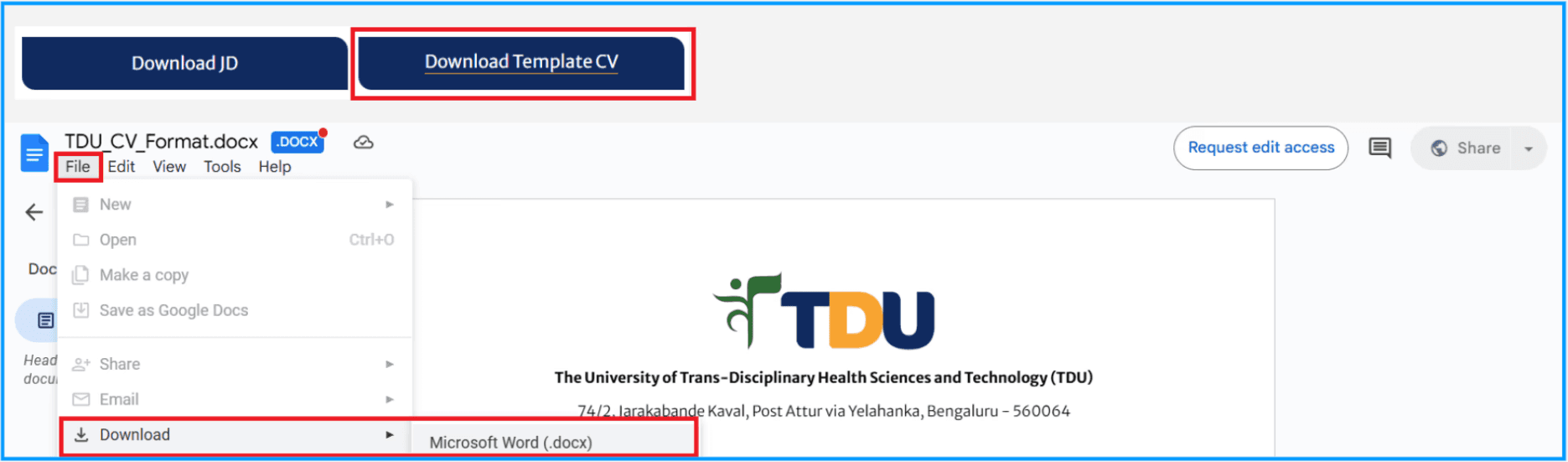
To download the CV template, please follow the steps below :
1) Click the Download Template CV tab
2) The template will open in Google Docs
3) Navigate to File in the top-left corner
4) Select Download
5) Choose Microsoft Word (.docx)
6) The document will then be saved to your device
Please refer to the attached image for guidance